
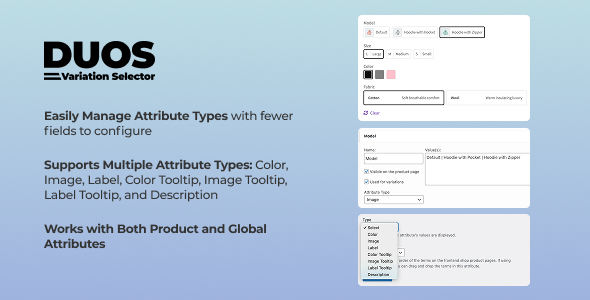
The Duos Variation Selector for WooCommerce is a specialized WordPress plugin designed to transform how product variations are presented on your online store. It redefines the traditional dropdown menu approach for WooCommerce, offering store owners a visually engaging method to display their product options. This Duos Variation Selector focuses on clarity and user interaction, moving beyond simple text-based choices to a more intuitive selection process for customers browsing variable products. It is built for anyone managing an e-commerce site with products available in multiple attributes like size, color, or material, aiming to streamline the selection experience.
Instead of a standard dropdown list that requires a click to reveal options, this plugin presents attributes as interactive elements directly on the product page. When a customer views a product, they see available options laid out as buttons, color swatches, or image thumbnails. Clicking one of these options immediately highlights the selection and, if configured, updates the main product image or price to reflect the chosen variation, providing instant visual feedback.
The plugin allows for several display types, moving beyond basic text. For instance, a clothing store can show color options as small, clickable color swatches. When a customer clicks the "blue" swatch, the main product image of the shirt changes to its blue version. Similarly, a jewelry store might use image swatches where each thumbnail displays a specific metal finish, making it clear what "rose gold" or "silver" looks like on the item.
Beyond visual attributes, label swatches are available for text-based variations such as sizes (S, M, L, XL) or material types (Cotton, Linen, Silk). These appear as distinct buttons, automatically disabling any combination that is out of stock or unavailable for the selected attribute. For example, if a "Large" size in "Red" is out of stock, clicking "Red" would then grey out or hide the "Large" size button, preventing customers from attempting to select unavailable items and reducing frustration at checkout.
The variation selectors integrate seamlessly with the standard WooCommerce "Add to Cart" button. Once a valid combination of attributes is chosen by clicking the various swatches or labels, the "Add to Cart" button becomes active. If a customer attempts to add a product to their cart without selecting all required variations, the system will prompt them to complete their choices, ensuring accurate order submission.
This solution is built to integrate directly with core WooCommerce functionality, leveraging existing product attribute data without requiring separate data entry. It works alongside most standard WordPress themes that adhere to WooCommerce best practices. Store owners will find that the enhanced variation display provided by the plugin for WooCommerce typically coexists well with other common plugins, such as those for product galleries, quick views, or filtering, provided they also follow standard WooCommerce hooks and templates.
Consider an online store selling custom furniture. With Duos Variation Selector, customers can visually choose wood type (Oak, Maple, Walnut represented by image swatches), fabric color (represented by color swatches), and leg style (represented by label buttons). Each selection updates the displayed product photo and price, allowing customers to build their custom piece directly on the product page. This clear visual feedback streamlines the configuration process, making it easier for shoppers to envision their final product and reducing the likelihood of ordering errors.
Implementing the Duos Variation Selector for WooCommerce means transforming a functional but often uninspiring part of your online store into an engaging interaction point. It provides a straightforward way to present complex product options visually, ensuring customers can easily understand, select, and confidently purchase the exact product variation they need. This approach not only improves the user experience but also helps in reducing customer inquiries related to product variations, fostering a more efficient and satisfying shopping journey.
There are no reviews yet.
From multipurpose themes to niche templates