
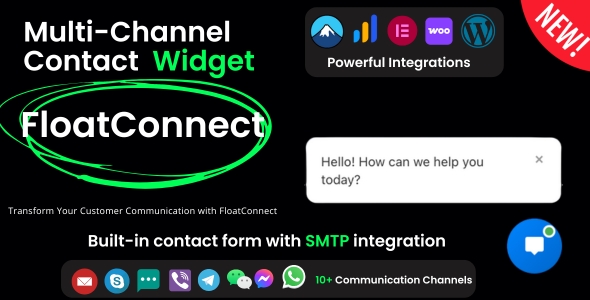
FloatConnect, an Advanced Multi-Channel Contact Widget for WordPress, provides a centralized communication point for website visitors. This plugin streamlines how users connect with a site, offering a dedicated, non-intrusive interface for various contact methods. It is primarily designed for WordPress site owners who aim to consolidate communication channels, ranging from customer support inquiries on e-commerce platforms to direct messaging for service-based businesses, or even social media links for content creators. The widget aims to make visitor contact straightforward and readily available across all pages.
Upon page load, the widget typically renders as a small, circular icon positioned at a fixed point on the screen, often in the bottom-right or bottom-left corner. This icon remains visible as the visitor scrolls, ensuring constant accessibility without interfering with content consumption. When a visitor clicks this compact icon, a panel smoothly expands, revealing a structured list of available contact options. This panel overlays the existing page content, focusing the user’s attention on the communication choices.
The core functionality of FloatConnect – Advanced Multi-Channel Contact Widget for WordPress centers on its ability to present multiple communication avenues within a single, organized interface. Site administrators can configure a range of channels, including direct links to WhatsApp, Telegram, email addresses, phone numbers, or various social media profiles. Each channel appears as a distinct row within the expanded panel, typically featuring a relevant icon and a descriptive text label, making the purpose of each option clear at a glance.
Configuration of these channels occurs within the WordPress dashboard, where an intuitive settings panel allows for easy management. Users can add new contact methods by selecting from a predefined list of service types, then inputting the corresponding URL, phone number, or email address. The order in which these channels display on the front-end panel is also customizable, allowing administrators to drag and drop entries to prioritize specific contact routes for their visitors.
FloatConnect integrates seamlessly into the WordPress environment, leveraging standard coding practices to ensure compatibility across a wide range of themes and other plugins. The plugin operates with a lightweight footprint, adding minimal overhead to page load times and avoiding common conflicts that might arise from heavily customized scripts. This design approach means that when FloatConnect is active, it relies on established WordPress hooks and filters for its functionality, promoting stability and smooth operation within the ecosystem.
The Advanced Multi-Channel Contact Widget for WordPress proves valuable across diverse website scenarios where direct visitor interaction is key. An e-commerce store can utilize it to consolidate WhatsApp support, email inquiries, and live chat links, all accessible from a single point on every product page. Similarly, a professional services website can offer quick access to a booking form, a direct phone call option, and social media profiles for portfolio viewing, enhancing client engagement without cluttering the main navigation menus.
From a visitor’s perspective, the process is straightforward: they spot the floating icon, click it, and instantly see their preferred contact methods laid out. There is no need to navigate to a separate contact page, search through menus, or scroll extensively to find relevant information. This direct access promotes immediate engagement, reducing friction for users who have questions or wish to connect quickly. The panel simply closes when the user clicks away or selects a contact option, returning the page to its original state.
In summary, FloatConnect – Advanced Multi-Channel Contact Widget for WordPress establishes an efficient and user-friendly gateway for site communication. It centralizes diverse contact options into a single, accessible interface, contributing to a fluid user journey. By providing a customizable and visually cohesive contact hub, this plugin allows site owners to simplify how visitors initiate conversations, ultimately fostering better connectivity without disrupting the content experience.
There are no reviews yet.
From multipurpose themes to niche templates